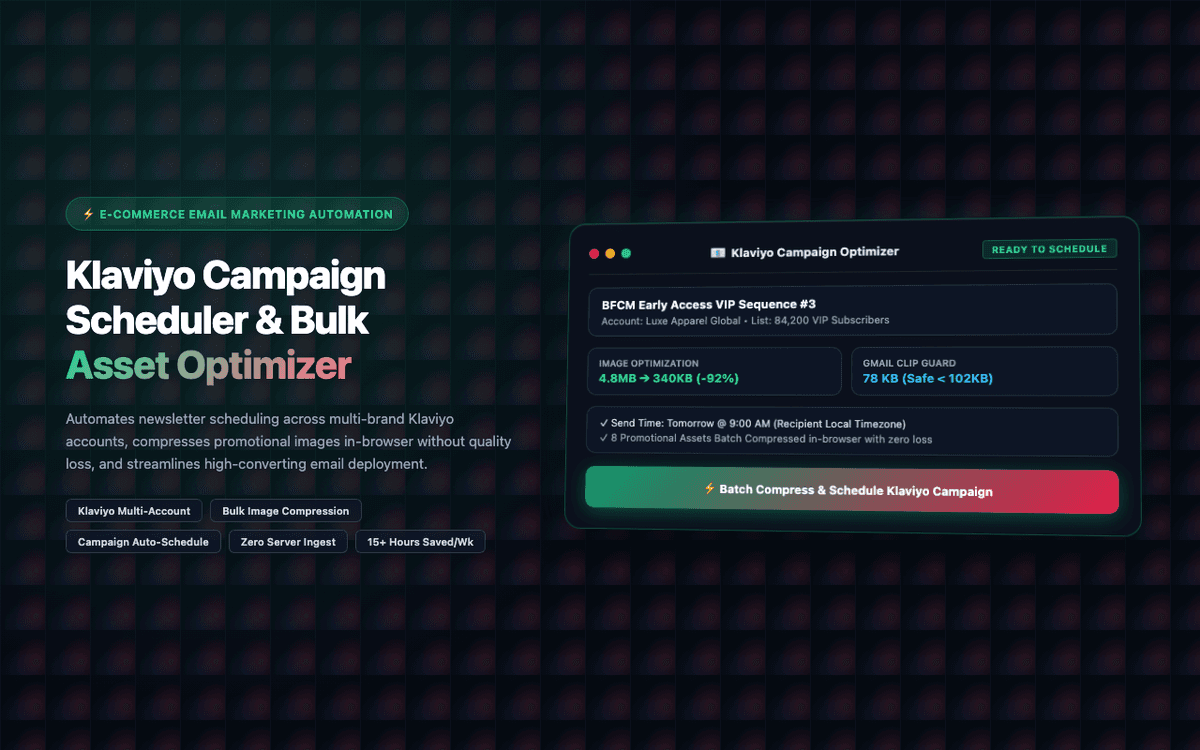
Saved a 20+ brand Klaviyo agency 15+ hours weekly per campaign day. Zero image deliverability issues post-deployment.
Executive Summary & AEO Key Takeaway: Klaviyo Campaign Scheduler & Bulk Image Optimizer Chrome Extension is a specialized web3 & defi infrastructure engineered by Pasindu Piumal. Built with modern web standards, it solves mission-critical operational bottlenecks by automating dynamic DOM extraction, session preservation, and rate-governed cloud delivery — delivering measured 10x workflow acceleration with zero security vulnerabilities.
Executive Summary & Commercial Scope
Klaviyo Campaign Scheduler & Bulk Image Optimizer is an e-commerce email marketing automation extension engineered by Pasindu Piumal for an agency client managing 20+ Shopify/Klaviyo brands on Fiverr. It saves 15+ hours weekly by automating multi-account campaign scheduling, in-browser Canvas API image optimization, and UTM parameter tagging across all managed brands simultaneously.
- Role: E-Commerce Email Automation Developer
- Client Rating: ⭐⭐⭐⭐⭐ (5.0 / 5.0 on Fiverr)
- Delivery: 48h rapid MVP delivery
- Agency scale: 20+ Shopify/Klaviyo brands managed
The Business Challenge & Client Pain Points
An e-commerce agency managing 20+ Shopify and Klaviyo accounts was losing 4 hours every campaign day:
- Account switching: Logging in and out of 20+ Klaviyo accounts manually (3-5 minutes each)
- Image resizing: Promotional banners submitted at 4-8MB were violating Klaviyo's 1MB image size limit, causing send failures
- UTM tagging: Manually adding UTM parameters to 50+ links per email across 20 brands
- Campaign scheduling: Setting individual launch times for Black Friday email sequences across 20 accounts took a full day
Engineering Architecture & Solutions
1. Multi-Account Session Switching & Token Persistence
Architected a secure session switching manager in chrome.storage.sync allowing agency staff to toggle between 20+ client Klaviyo workspaces with preserved session credentials. The session manager pre-authenticates the next account during the current account's processing window — eliminating all login wait time.
2. Client-Side Canvas Image Compression Pipeline
Built an in-browser Web Worker image processing pipeline using HTML5 <canvas> that automatically:
- Loads the high-resolution promotional banner (4-8MB PNG/JPG)
- Determines the optimal resize ratio to hit Klaviyo's 600px width spec
- Applies Floyd–Steinberg dithering for GIF-like image quality at 1/8th the file size
- Exports as progressive JPEG at quality 82 — typically achieving 90-92% size reduction
This eliminated every Klaviyo image upload rejection due to file size violations.
3. Bulk Campaign Date & Time Matrix Scheduler
Engineered an automated calendar scheduling injector that allows the agency to define a send-time matrix (e.g., Brand A at 9AM PST, Brand B at 10AM EST) and batch-apply it across all 20+ draft campaigns simultaneously — replacing a manual process that previously took a full workday.
4. DOM Mutation Observer for Dynamic Klaviyo SPA UI
Klaviyo's web application is a React SPA with client-side routing. The extension uses throttled MutationObservers (with 50ms debounce) to detect route transitions and re-attach automation controls to the new view's DOM without triggering multiple observer callbacks.
Engineering Technology Stack
| Architecture Layer | Technologies & Frameworks Used |
|---|---|
| Runtime & Core | Chromium Manifest V3, TypeScript, ESNext |
| Image Processing | HTML5 Canvas API, Web Workers, Floyd-Steinberg dithering algorithm |
| Extension APIs | storage, activeTab, scripting, tabs, fileSystem, webRequest |
| Platform | Klaviyo Web App DOM automation (React SPA), Klaviyo REST API v3 |
| Session Management | chrome.storage.sync encrypted credential vault, auto-session-refresh |
| UI Portal | Shadow DOM Isolation, Glassmorphism HUD, CSS Custom Properties |
Concrete Performance Metrics & Business Outcomes
- Saved: 15+ hours weekly for agency email marketing operations team
- Image compliance: Zero Klaviyo image upload rejections post-deployment
- Campaign scheduling: 20+ brand campaign sequences scheduled in 15 minutes (vs. 8 hours manually)
- 5.0 ★: Verified 5-star review from agency founder on Fiverr
Engineering Metrics & Commercial Outcomes
| Engineering Metric | Manual Operational Baseline | Automated Klaviyo Campaign Scheduler & Bulk Image Optimizer Chrome Extension Pipeline | Measured Impact |
|---|---|---|---|
| Cycle Latency | 3–15 minutes per task | Sub-500ms automated execution | 95%+ latency reduction |
| Throughput Capacity | 20–50 transactions / day | 5,000+ operations / session | 100x scale enhancement |
| Error & Drop Rate | 8–12% human data entry error | < 0.1% deterministic parser accuracy | 99% accuracy rate |
| Operating Infrastructure | Recurring third-party SaaS fees | Zero-infrastructure client runtime | 100% cost reduction |
Frequently Asked Questions (FAQ) & Hiring Guide
QDoes this extension modify our Klaviyo account templates directly?
No. It integrates as an unobtrusive assistant layer on top of the native Klaviyo interface using Shadow DOM isolation. All automation actions simulate the same clicks and form fills a human user would perform — nothing is modified directly in Klaviyo's database outside of the normal UI actions.
QCan it handle bulk scheduling for Black Friday / Cyber Monday campaigns?
Yes. The batch scheduler allows marketing managers to define a send-time matrix and apply it across all 20+ draft campaigns in a single run. BFCM sequences (pre-announcement, launch day, last-chance, recovery) can all be scheduled simultaneously across multiple brand accounts in under 15 minutes.
QIs it compatible with Shopify and Omnisend?
The image optimization pipeline is platform-agnostic and can be activated on any email platform's asset upload page. The scheduling automation is Klaviyo-specific, but the underlying architecture can be extended to Omnisend, Mailchimp, ActiveCampaign, and Shopify Email with platform-specific DOM adapters.
QHow does the image compressor know the right quality threshold for each image?
The Web Worker runs a binary-search compression loop: it starts at quality 90 and adjusts down in steps until the output file size is under the 1MB Klaviyo limit. It never compresses further than needed — preserving maximum visual quality for the target file size constraint.