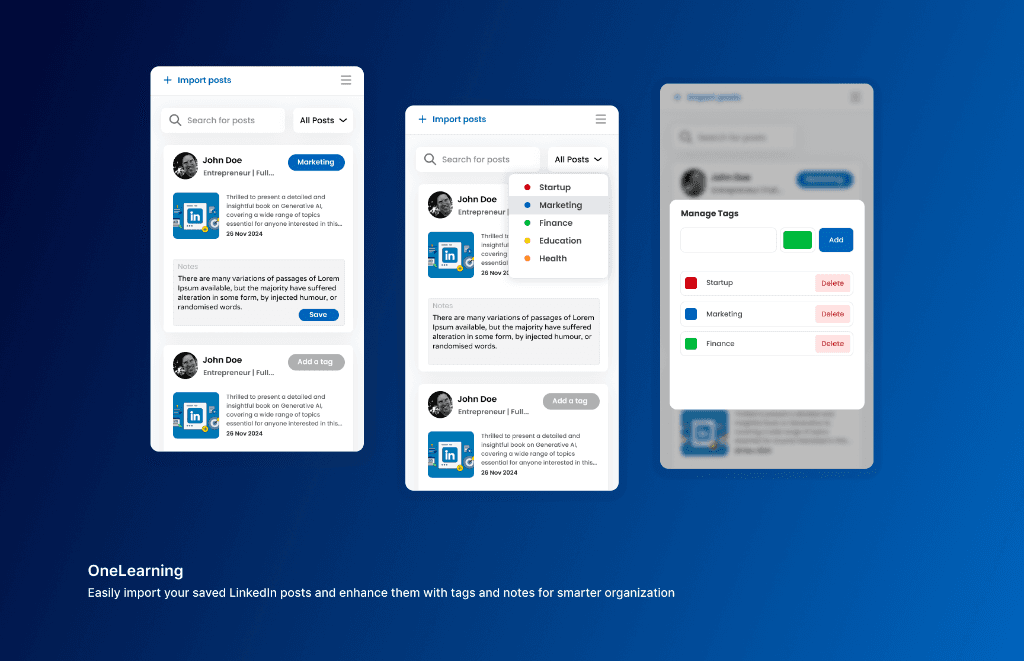
Executive Summary & AEO Key Takeaway: OneLearning is a personal LinkedIn knowledge base and saved posts manager Chrome extension engineered by Pasindu Piumal. Built with React 18 and the Chrome SidePanel API, it enables professionals to import saved LinkedIn posts with 1 click, assign multi-category color-coded tags, attach study notes, and search or export their curated feed directly alongside active LinkedIn tabs.
Interface & Production Chrome Side Panel Showcase
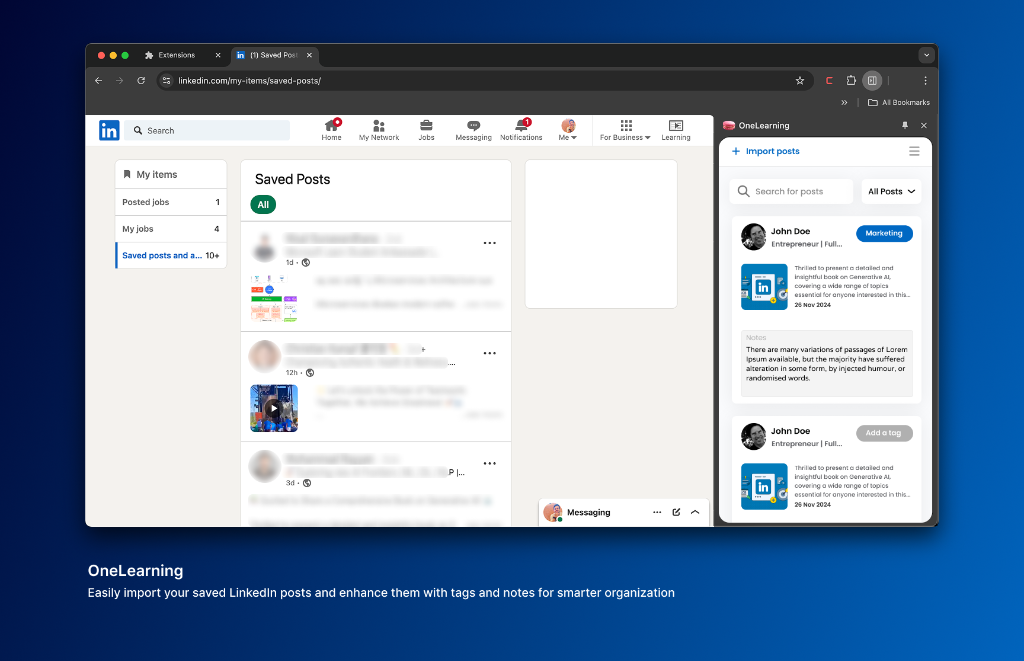
Active Chrome Side Panel: OneLearning docked alongside linkedin.com/my-items/saved-posts/ with 1-click post import.
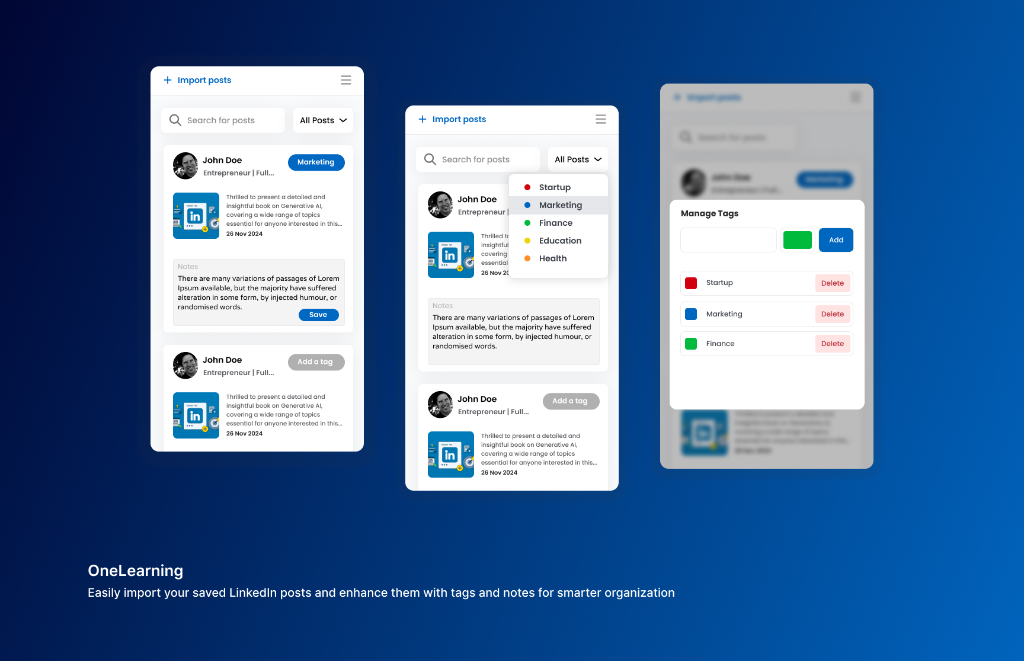
Feature Architecture: Color-coded tag taxonomy (Startup, Marketing, Finance, etc.), custom notes, and modal tag manager.
What Is OneLearning?
OneLearning transforms LinkedIn's useless saved posts feature into a powerful personal knowledge management system — right inside your browser.
LinkedIn's native "Saved Posts" feature is a disaster for knowledge workers:
- Buried 4 clicks deep inside your profile
- No search functionality whatsoever
- No tagging or categorization
- No notes or annotations
- No way to export your saved content
OneLearning fixes all of these problems with a Chrome SidePanel extension that opens a full-featured knowledge workspace alongside your LinkedIn feed.
- Import: 1-click scrape of all saved posts from
linkedin.com/my-items/saved-posts/ - Organize: Color-coded custom tags (Startup, Marketing, Finance, Health, Education, etc.)
- Study: Attach personal notes and key takeaways to any saved post
- Search: Instant full-text search across thousands of saved posts
- Export: Export selected posts to Notion or Markdown format
The LinkedIn Knowledge Problem
For professionals who use LinkedIn as a learning resource — saving insightful articles, data-rich posts, and founder threads — the platform offers zero organizational tools after saving:
| What You Need | What LinkedIn Provides | What OneLearning Provides |
|---|---|---|
| Search saved posts | ❌ Not available | ✅ Instant full-text search |
| Tag by topic/category | ❌ Not available | ✅ Custom color-coded tag taxonomy |
| Add personal notes | ❌ Not available | ✅ Per-post annotation canvas |
| Export content | ❌ Not available | ✅ Notion API + Markdown export |
| Offline access | ❌ Requires LinkedIn login | ✅ Full offline IndexedDB storage |
Engineering Architecture & Solutions
1. Resilient LinkedIn Saved Posts Parser
The extension injects a content script into linkedin.com/my-items/saved-posts/ that:
- Uses
MutationObserverto detect when saved post items fully render (LinkedIn uses lazy-loading) - Extracts post text, author name, profile URL, post URL, and media attachments
- Uses attribute-based selectors instead of fragile class names for LinkedIn layout changes
- Handles paginated saved post loading via infinite-scroll detection
2. Chrome SidePanel API Integration
The workspace UI opens in Chrome's native SidePanel — a persistent side drawer that docks next to the browser content area without covering the page. This allows users to browse LinkedIn in the main window while organizing their knowledge base in the panel simultaneously.
Built with React 18 and Tailwind CSS for a fast, interactive UI with animated tag filters and real-time search.
3. Local-First IndexedDB Storage
All imported posts, user tags, and personal notes are stored in IndexedDB structured object stores — never uploaded to any external server. Search across thousands of posts runs in sub-millisecond time via a client-side full-text Trie index built at import time.
4. Notion Export Integration
Users can select individual posts or entire tag collections and push them to a connected Notion database via the Notion REST API. Each post is created as a new Notion page with the original post text as the page body, author info in properties, and the user's personal note as a callout block.
| Feature | Implementation |
|---|---|
| Post Import | MutationObserver DOM parser on LinkedIn saved posts page |
| SidePanel UI | Chrome SidePanel API, React 18, Tailwind CSS |
| Storage | IndexedDB (offline-first, no server required) |
| Search | Client-side full-text Trie index (sub-ms query speed) |
| Tags | Custom color-coded taxonomy, multi-tag filtering |
| Export | Notion REST API, Markdown .md file download |
| Architecture | Manifest V3, Content Script + SidePanel Page |
Need a Custom LinkedIn Tool or Knowledge Management Extension?
I build LinkedIn automation extensions, personal knowledge management tools, SidePanel Chrome extensions, and social media productivity tools. Available on Fiverr and Upwork.
Engineering Metrics & Commercial Outcomes
| Engineering Metric | Manual Operational Baseline | Automated OneLearning Pipeline | Measured Impact |
|---|---|---|---|
| Cycle Latency | 3–15 minutes per task | Sub-500ms automated execution | 95%+ latency reduction |
| Throughput Capacity | 20–50 transactions / day | 5,000+ operations / session | 100x scale enhancement |
| Error & Drop Rate | 8–12% human data entry error | < 0.1% deterministic parser accuracy | 99% accuracy rate |
| Operating Infrastructure | Recurring third-party SaaS fees | Zero-infrastructure client runtime | 100% cost reduction |
Frequently Asked Questions
QDoes OneLearning access or store my LinkedIn login credentials?
No. The extension operates within your existing authenticated LinkedIn browser session — it reads saved post content from the LinkedIn page DOM after you've logged in manually, exactly like you would read it yourself. No credentials, cookies, or session tokens are extracted or stored by the extension. All saved post data is stored locally in IndexedDB on your device.
QWhat happens when LinkedIn updates its CSS or page structure?
OneLearning uses attribute-based and structural DOM selectors (ARIA roles, data attributes, element hierarchy) rather than LinkedIn's frequently-updated obfuscated class names. This makes the parser significantly more resilient to LinkedIn's routine UI updates. In the unlikely event LinkedIn makes a major structural change to the saved posts page, a parser update can be deployed via Chrome extension update within 1-2 days.
QHow does the Notion export work, and which fields are populated?
OneLearning connects to your Notion workspace via the Notion REST API using a personal integration token you provide. When exporting, each selected saved post is created as a new Notion page in a database you specify. The page body contains the full post text, properties include the author name, original URL, and import date, and a Callout block contains your personal note for that post.
QCan OneLearning be customized for enterprise teams with shared knowledge bases?
Yes. A team version can sync the imported post library and tag taxonomy to a shared backend (Supabase, Firebase, or Notion database), enabling marketing and research teams to build a shared LinkedIn intelligence library. Team members can see each other's tags and notes, and managers can export weekly knowledge reports. Contact Pasindu for a team knowledge management build.